A Hanafuda Koi-Koi App for Apple Platforms
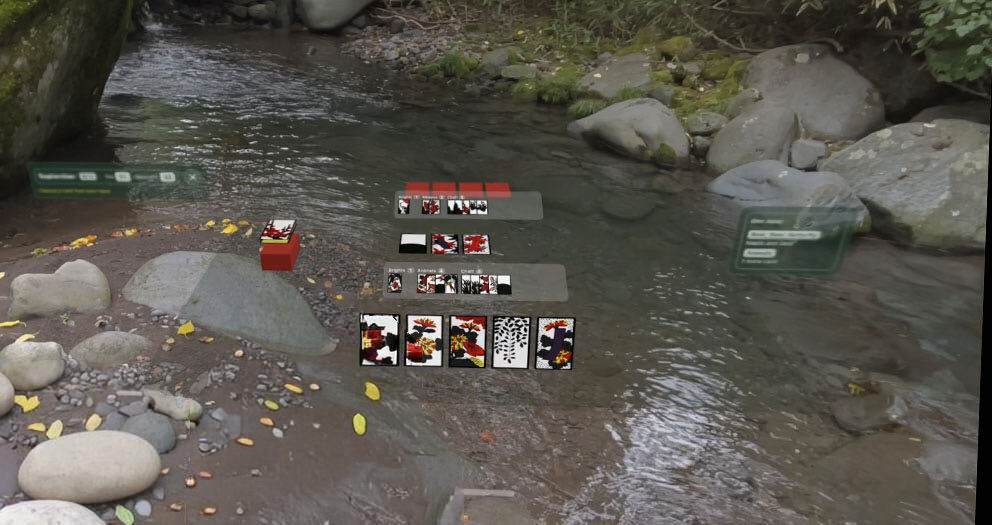
I’ve released Koikoi, an app for playing the hanafuda card game Koi-Koi on iPhone / iPad / Mac / Apple Vision Pro.
There are no ads and no in-app purchases, and it plays offline.
Motivation
I love hanafuda, enough to have built a hanafuda app that runs in the terminal and to have drilled it into my kids from an early age.
On the iPhone, iPad and Mac I use every day, I had only ever found apps with features I didn’t need, or apps that were paid or came with ads, and I wanted a clean hanafuda app built with SwiftUI.
I also wanted to try building, as an experiment, hanafuda you can play in XR space on Vision Pro.
The source of truth for the rules is the implementation and tests of the Go version, so this time I ported that to Swift and spent my effort on how the cards look and how they play on each device.
How to play
When you launch it, the game setup screen comes up: pick the number of rounds (3 Rounds, 6 Rounds or 12 Rounds), the difficulty and the theme, and start.
- Difficulty: Easy / Normal / Hard / Expert
- Theme: System / Felt / Tatami / Night
- Controls: tap, drag and drop, arrow keys
It shows the yaku you’ve completed and the “reach” for yaku that are one card away.
Your game is saved automatically, so if you close it partway through, you can pick up where you left off.
It also supports Game Center leaderboards.
Mac
On the Mac, the window lays out your captures, the field and your opponent’s captures side by side in three columns.
You can play all the way through with just the keyboard: choose a card with the arrow keys, play it with Return / Space, and cancel with Esc.
The window resizes freely, and turning on “Translucent Background” lets the desktop show through.
Apple Vision Pro
The visionOS version puts a life-size table inside a volumetric window.
The cards are laid out on the table, and you pick them with your eyes and a pinch.
The yaku panel and the scoreboard can be moved anywhere by grabbing the bar at their bottom edge, and the positions you move them to are saved.
Installation
You can install it from the App Store.
It supports iPhone / iPad / Mac / Apple Vision Pro, and is offered as a single app.
It requires iOS 26 / macOS 26 / visionOS 26 or later.
The source code is on GitHub, and you can run the rules engine tests locally.
git clone https://github.com/ngs/koikoi-swift.git
cd koikoi-swift
swift test                 # tests for the rules engine, opponent and view models
tuist generate --no-open   # generates the Xcode workspace
The card artwork and the app icons live in a separate private repository and are not covered by the MIT license, so the app itself can’t be built from the public repository alone.
Under the hood
The app is implemented in Swift 6 and is made up of the following three modules.
| Module | Role | Main types |
|---|---|---|
KoikoiCore | Card definitions, yaku evaluation, round and match flow. Ported from the Go version, with no dependencies other than Foundation | Card / Game / YakuChecker / HeuristicOpponent |
KoikoiAI | Search for the opponent | RoundSimulator / Determinizer / ISMCTSEngine |
KoikoiUI | SwiftUI views and view models, shared across all platforms | GameViewModel / GameRecord |
KoikoiAI calls itself AI for historical reasons, but it doesn’t use an LLM or any machine learning model; the algorithms are implemented in pure Swift.
- Normal: the evaluation rules in
HeuristicOpponent(ported fromcpu.goin the Go version), which value the cards at Brights 20 / Animals 10 / Ribbons 5 / Chaff 1 and pick the move that captures the highest total - Easy: the Normal rules, plus a random play one time in three, and it never calls koi-koi
- Hard: the Normal rules, plus a bonus for moves that capture Brights or the cards for Boar, Deer, Butterfly, Red Poetry Ribbons and Blue Ribbons, and it calls koi-koi aggressively when it has cards to spare
- Expert: a search in
ISMCTSEngine(Information Set Monte Carlo Tree Search), which assumes the opponent’s hidden cards and runs 400 simulations per move
Cards and IDs
The cards are a fixed array of 48, and the order of id (0–47) is the same as AllCards in the Go version.
enum Month: Int { case january, february, /* ... */ december }
enum CardType: Int { case kasu, tane, tanzaku, hikari }

struct Card {
    let id: Int        // 0–47, same order as the Go version
    let month: Month
    let type: CardType
}

// Card.all[0] = Card(id: 0, month: .january, type: .hikari)   // Pine and Crane
// Card.all[1] = Card(id: 1, month: .january, type: .tanzaku)  // Pine with Red Ribbon
The Go tests came over too, still building cards from lists of IDs.
Expert’s search
Expert reshuffles the opponent’s hand and the deck, which it can’t see, so that the card counts still add up, assumes that as one possible position, and plays the round out to the end from there using the Normal evaluation rules.
// An assumed position (the opponent's hand and the deck dealt again)
struct RoundSimulator {
    var game: Game
    var phase: RoundPhase
}

// One node of the search tree
final class Node {
    let move: Move?
    var children: [Move: Node]
    var visits: Int           // times this node was visited
    var availability: Int     // times this move was playable
    var totalReward: Double   // sum of rewards, win/loss and points mapped to 0–1
}
It repeats this 400 times and picks the move that was visited most.
Saving games
A game is saved not as a snapshot of the board but as the random seed plus a record of every move by both players.
struct GameRecord: Codable {
    var rounds: Int              // 3 / 6 / 12
    var difficulty: Difficulty   // easy / normal / hard / search
    var seed: UInt64             // random seed (the deal comes from this too)
    var moves: [Move]            // moves played (both players, in order)
}

enum Move: Codable {
    case playHand(handID: Int, fieldChoiceID: Int?)  // play a card from the hand
    case chooseDrawnField(fieldID: Int)              // where a card drawn from the deck captures
    case koikoi
    case shobu
}
When a game is opened, it rebuilds the same deal from the seed and applies moves in order from the start to get back to the same position.
Feedback
Please send bug reports and feature requests to GitHub Issues.
If you play, I’d love to hear how it goes.
Related Posts
2026-07-28
2020-05-15